All news · Patch notes
Mobile 1.0.127: new buttons, private messages and smoother play
The phone version's buttons now follow the game's wood and bronze theme; private messages, Menu and Chat buttons are added and the game runs smoother on low settings.
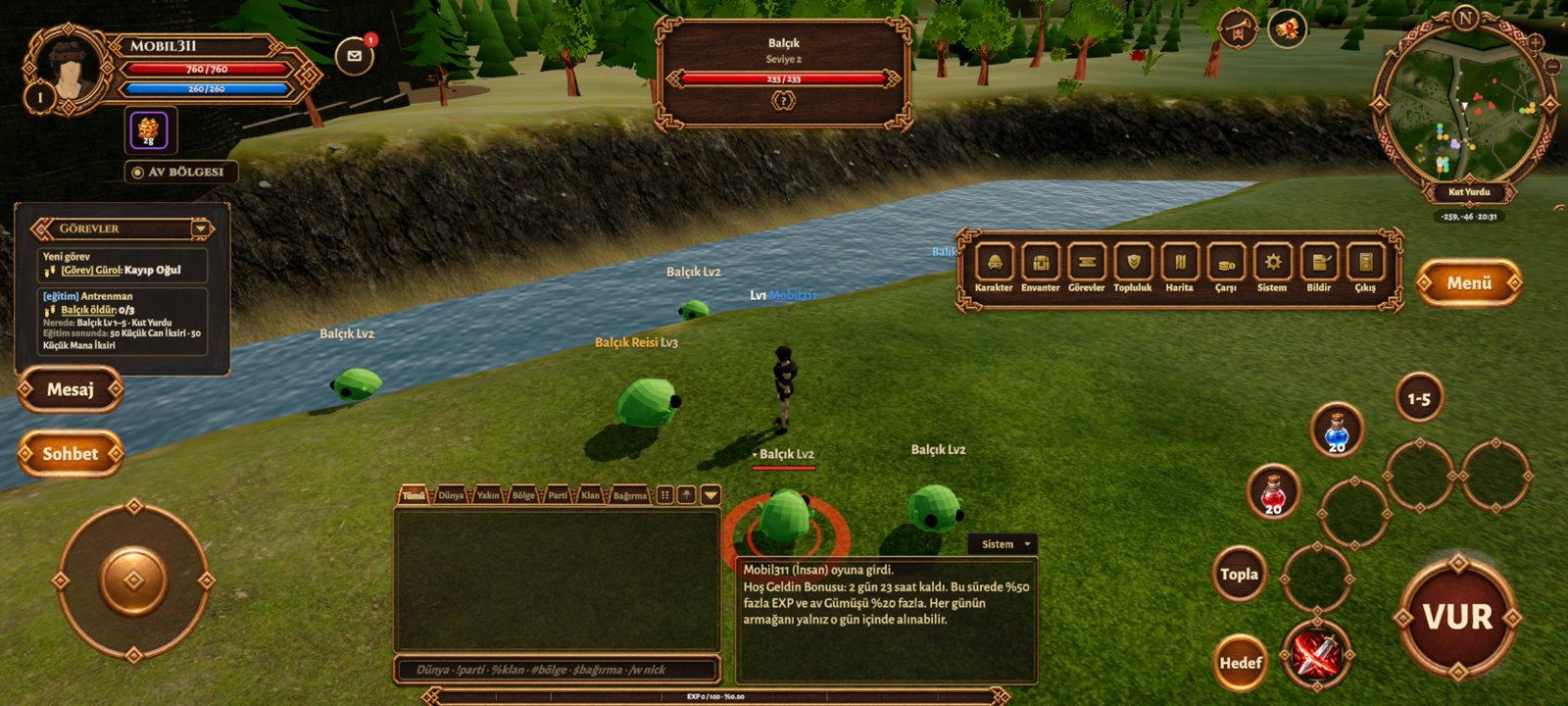
- New lookHIT, the skill slots, Target, Loot, potions and the movement pad are now carved wood and bronze buttons that glow when pressed.
- Menu buttoncharacter, inventory, settings and the other windows no longer stay on screen; the Menu button opens them and they close after a choice.
- Chat buttonshows or hides the chat and system boxes. While hidden, a red dot lights up when a new message arrives.
- PM buttontype a character name to open a private message window; the message is sent with the keyboard ✓ key or the Send button. A red dot on the button marks unread messages.
- •The tutorial step "Select a Target and Attack" could not be completed on phones: it now completes when you select an enemy with Target and attack with HIT.
- Smoother playon Low and Medium the render resolution really drops, the extra water pass is off and the terrain is lighter; if the game cannot hold 60 FPS it locks to 30 FPS.
- •Skill and potion icons are round, the on-screen controls are smaller, and character and NPC names sit right above their heads.
- •Updates now happen inside the game: open Kuzark and the new version downloads in the game, then just tap Update when Android asks; your characters are kept. (The first time, Android asks once to "Allow from this source".) If your phone has a version installed before 19 November, install the new APK once from kuzark.com/en/mobil.html to get this feature.